


What’s New in DataGrows: June 2026 Product Updates
Updated: Jun 2
We’re excited to share the latest round of DataGrows upgrades that went live on 1 June 2026. This release includes some long‑awaited functionality, interface improvements, and practical tools designed to make your day‑to‑day work faster, cleaner, and easier.
From the launch of the SARS API for IRP6s!!!!! to navigation improvements and new tables that declutter your client records, here’s everything you need to know.
**Please note an important change in this upgrade: If you mark a main task as complete, all Subtasks will be marked as complete as well.
Here is an overview of some big updates that we will cover:
SARS API Is Now Live
At last — the SARS API integration for IRP6s is officially live.
You can now:
Request IRP6s
Refresh historical data
Submit IRP6s
…directly through the new SARS API inside DataGrows.
We know this has been a long wait, and we truly appreciate your patience. This integration is just the beginning; we’ll continue improving it to make working with SARS easier than ever.
👉 For a step‑by‑step walkthrough, check out the dedicated blog post, or reach out to support if you need assistance.
Improved Left‑Hand Navigation and Favourites section
When you log into DataGrows, you’ll notice that the left‑hand navigation has been refreshed.
What’s changed:
Related items are now grouped together to reduce clutter and make navigating easier
You can also use the three‑dot menu on any table to Add it to your Favourites section at the top of the navigation
Take a few minutes to explore the new layout — it’s designed to help you find what you need faster.

SARS Taxpayer Table Update
The SARS Taxpayer table has moved and is now located under:
Setup → Integration → SARS Taxpayers
Important to note:
This table is only used for initial onboarding. Do not maintain this table regularly.
It is not required for the new SARS API integration
Notifications Panel
You’ll now see a Notifications panel on the left‑hand side.
This will notify you when:
Tasks are assigned to you
Various background processes are still running, incl data uploads, invoice posting etc.
We’ll continue expanding this panel with more notifications over time.
Cleaner Client Records with Tabs
We’ve made improvements to the Client table to make it easier to work with:
Client records now open with a tab structure at the top
The interface is cleaner and less overwhelming
The top menu has been reorganised
Favourites are also available here for quick access
New Task Reassignment Actions
We’ve added a new action called 'Assign all incomplete tasks as per client' to the Client table to give you better control over task management. When actioned, it will reassign absolutely all tasks that are not marked complete based on the newly assigned accountant, partner, manager, or clerk. This improves on the old action, which is still available but only reassigns tasks that remain untouched.
Reports Dropdown on Tables
At the top of each table, you’ll now see a Reports dropdown.
This gives you quick access to reports related to that specific table. You will only see reports that you have permission to view. No more searching, the right reports are exactly where you need them.
Save and View Button Changes
On some tables, the Save and View button has been removed. This was done intentionally:
Save and View remains on tables where it’s useful (for example, tax calculations) so you can save and immediately see your updated record.
On other tables, Save and Close keeps workflows simpler and cleaner
New Authorised Shares Table
We’ve introduced a brand‑new Authorised Shares table, which you can access by clicking on a record in the Client table, then going to Additional Details - Authorised shares.

What this means for you:
All captured Authorised Shares have been removed from the Client table and added as an Ordinary Shares record in the Authorised Shares table. If this was not an ordinary share type, please amend the record.
You can track all Authorised share types in one place. The share register will warn you of the share type and Authorised share limits.
If shares are added in the Share Register, they automatically roll up here, allowing you to:
See totals per share type
Easily track when you’re approaching authorised share limits.
Look out for a fully-fledged companies register in the next round of upgrades, launching with all client details!
New Related Parties Table
To further declutter client records and make Beneficial Ownership easier, we’ve introduced a Related Parties table. If you do not see this table, please ask your manager for access.
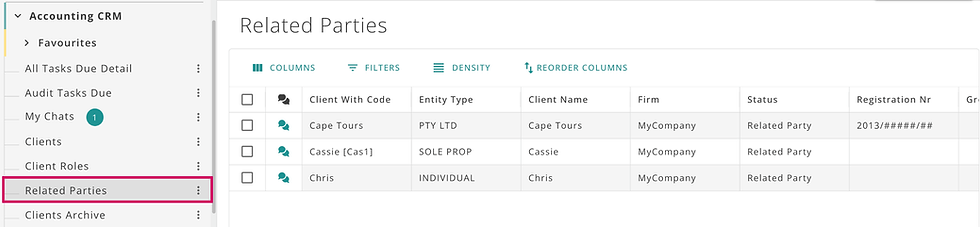
Key changes:
Entities previously marked as Status: beneficial ownership structures are now marked as Related Parties
These records have been moved out of the Client table and into the Related parties table
Any updates made to a related party record now update across:
Directors/members/trustees/beneficiaries
Shareholders
Beneficial ownership
👉 If you already have directors set up, a macro can update them to related parties — please contact support, and we’ll help you with the transition. We highly encourage you to load your related parties into DataGrows. These are Entities you do not service but form part of your client's ownership structure. You are not charged for these records under the new client packs rule.
Link from CIPC Integration
If you connect via the CIPC integration and import information to the CIPC Enterprise Details table, then navigate to CIPC Directors. You can insert Directors and members directly to the Related parties table using the action “Create related party”. Provided you don’t change the names, the system prevents duplicates from being created.
Inactive Client Indicators
Anywhere you see a dropdown with a client indicator, you’ll now clearly see when a client is marked as inactive, helping prevent mistakes and confusion. This is especially helpful to prevent tasks from being added or time from being logged against inactive clients.

Firm‑Wide Feature Management
A new table allows you to switch off features your firm doesn’t use, even for Super Users.
For example, if your firm doesn’t offer audit services, you can disable them. This helps declutter the system and tailor it to your firm’s services
New Bulk Upload Options
Two new upload options are now available:
Rate Groups Upload
Update client rate groups in bulk
Fast and efficient for large changes
Remember to first create your rate groups in the rate groups table. This Excel is not a process that will insert new records. It exclusively updates the Clients table rate group field in bulk.
Clients Quick Upload Excel
A simplified version of the client upload
Reduced from 98 fields to 34
Includes only the essential fields needed to activate services
You’ll still have access to the full client upload if you prefer a more detailed setup.
Fixes:
We have added validation to check the registration date and to prevent scheduling a task for a period when the company didn't yet exist.
Sage client update address line overflow errors have been fixed, where the address would repeat multiple times for every client update.
Inactive sales items will no longer pull through to Accounting System Items from a Sage integration.
Other Changes:
We have split the Address fields in the Share register table to align with the new Related Parties table.
Compensation fund ROE comp due date is 30/06/2026, not 30 April as per the Labour Dept.
Client Packs and our price increase have gone live. Please purchase additional Client packs or licences if needed by going to Settings, My Plan, Change Plan.
Additions:
We have added a ‘return submitted’ checkbox to the Income tax individuals table.
The Trust Register is now available as a table for Body Corporate entity types. You can view it by clicking on the applicable client in the Client table.
If you have multiple databases, you will receive one consolidated to-do list report on a Monday morning
Need Help or Have Feedback?
A huge thank you to all the users who submitted suggestions for this upgrade. Your feedback helps us improve.
As always, we’d love to hear from you if you have any suggestions:
📧 Email: support@mydatagrows.com
💬 Or reach out via any of our WhatsApp support groups


Comments