


SARS Correspondence Integration
Updated: Mar 14
This post will cover how to connect to SARS for correspondence. If you have not connected your taxpayers through the API yet, please do so first. This post will explain how.
1. Downloading SARS Correspondence
DataGrows can download SARS Correspondence issued for clients from the first day of the current month for all your linked portfolios. We are working on automating the download of correspondence each night and will inform you once this is implemented.
To download the Correspondence from SARS:
1. Navigate to the clients table
2. Select the checkboxes of the clients you wish to download for
3. Select the Action Download SARS Correspondence.

4. View new letters in SARS → SARS Correspondence.
5. Click the download icon to save a copy of any letter.

2. Managing SARS Tasks
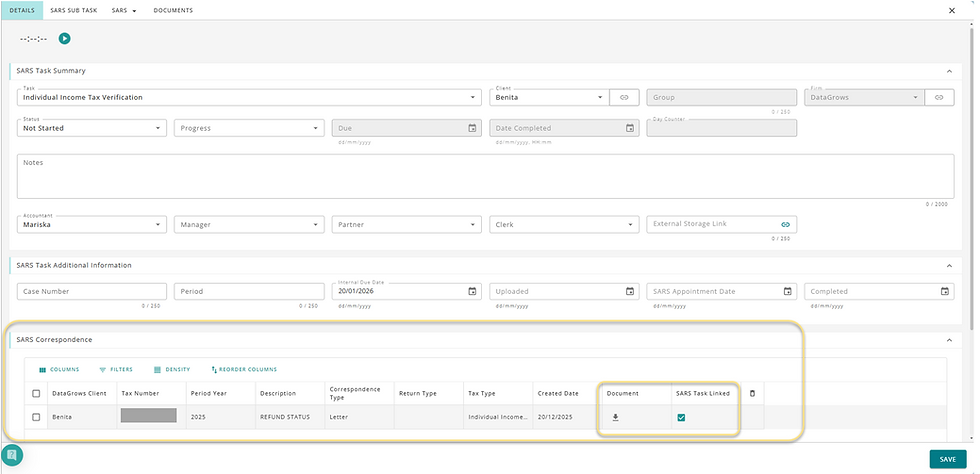
SARS correspondence can be linked to SARS tasks for accurate workflow tracking.
In SARS Correspondence:
View existing SARS tasks for the client
Link letters to specific tax periods

Create missing tasks manually if needed in SARS Tasks
Linked letters will appear inside the SARS Task record, ensuring a complete audit trail.
Staff can then easily keep track of issued letters and hold SARS accountable for their turnaround time.


Comments